In today’s e-commerce environment, fraud is more than an occasional nuisance,it’s a growing threat. From fake accounts and spam to high-risk orders, these malicious activities can damage your brand reputation and impact your bottom line. For WooCommerce store owners, staying one step ahead is essential. One of the most effective ways to secure your site is by Blocking IPs and Emails. This proactive step helps filter out bad actors before they can place orders or disrupt your store, ensuring a safer, more reliable shopping experience for genuine customers and safeguarding your revenue.
Additionally, enhancing your store’s security with tools like the Currency Switcher for WooCommerce by Aelia can further reduce the risk of fraud. By displaying prices in the customer’s local currency based on their location, this plugin helps create a transparent shopping experience, minimizing confusion, chargebacks, and unauthorized transactions. When combined with blocking suspicious IP addresses and email accounts, you build a robust defense system that keeps fraudsters out and ensures a smooth, secure checkout for legitimate shoppers.
Why Blocking IP Addresses Matters
Every device connected to the internet has a unique IP address, and fraudsters often exploit this by using disposable or masked IPs to carry out malicious actions, ranging from fake reviews and spam to fraudulent orders and costly chargebacks. Implementing IP blocking is a proactive security step that allows you to stop bad actors before they can interfere with your store operations. For a step-by-step tutorial, check out this guide on how to block fraud customers in WooCommerce.
Key Benefits of Blocking IP Addresses in WooCommerce
- Stop Fraudulent Orders at the Source:
Fraudsters frequently reuse IP addresses to place fake or risky orders. Blocking these IPs helps you prevent unauthorized transactions before they go through. - Safeguard Your Brand Reputation:
Activities like chargebacks and fake reviews can harm your store’s credibility. IP blocking minimizes exposure to these threats and reinforces your reputation as a trustworthy seller. - Enable Geographic Filtering:
If your fraud analytics point to abuse from specific regions, IP blocking lets you limit access or apply stricter rules to those high-risk areas. - Minimize Costly Chargebacks:
By intercepting fraudulent activity early, IP blocking helps reduce financial loss from chargebacks and protects your payment processing health.
Why Blocking Email Addresses Matters
Just like IPs, email addresses are often used by fraudsters to exploit online stores. Scammers frequently create fake or disposable email accounts to bypass filters, place fraudulent orders, submit spammy reviews, or trigger chargebacks. By blocking known or suspicious email addresses, you add another crucial layer of protection to your WooCommerce store. This helps you filter out malicious users early, before they can interact with your site or damage your business.
For example, if you’re managing international shipping for your WooCommerce store, it’s essential to have proper controls in place to ensure only legitimate transactions are processed. Setting up shipping zones for international shipping helps you manage these transactions efficiently, ensuring smooth and secure deliveries.
Key Benefits of Blocking Email Addresses in WooCommerce
- Stop Repeat Offenders:
Scammers often use the same or similarly structured email addresses to attack multiple stores. Blocking these addresses prevents repeat abuse and keeps your store clean. - Filter Out Fake Accounts:
Disposable or suspicious email domains are red flags. Blocking them helps reduce fake account creation and newsletter abuse. - Prevent Spam Reviews and Inquiries:
Fake users often submit spammy product reviews or bogus contact form messages. Email blocking stops these activities at the source. - Protect Your Checkout and Customer Data:
Blocking fraudulent emails prevents them from accessing your checkout process or posing as legitimate customers, safeguarding both your data and your customers’. - Improve Store Efficiency:
With fewer fake users clogging up your system, your site runs smoother, and your customer service team can focus on real shoppers.
Introducing Aelia Blacklister for WooCommerce
If you’re looking for an efficient way to block suspicious users and prevent fraudulent activities on your WooCommerce store, Aelia Blacklister for WooCommerce is an invaluable tool. This plugin empowers you to automatically block malicious users, including those with fraudulent IP addresses and email accounts, at the checkout stage, strengthening your store’s security.
Key Features of Aelia Blacklister
- Customizable Blocking Rules:
Aelia Blacklister lets you set up tailored rules to block users based on their IP address, email, phone number, name, or shipping address. You can define exact matches or use regular expressions for broader criteria. - Versatile Blocking Techniques:
The plugin offers a variety of blocking options, including:- Exact Match: Block specific entries such as a particular email address, IP address, or phone number.
- Partial Match (Regex): Block users whose details match patterns like specific domain names or phone number prefixes.
- Comprehensive Security:
By blocking a wide range of user details,email addresses, IP addresses, phone numbers, and shipping addresses,Aelia Blacklister provides a multi-layered approach to keeping your store secure. - Customizable Error Messages:
You can personalize the error messages shown to blocked users, offering a transparent and user-friendly experience while maintaining security. - Geolocation-Based Blocking:
Configure blocking rules based on the customer’s location, preventing transactions from high-risk countries or regions. - Chargeback Prevention:
By blocking repeat offenders and fraudulent users, Aelia Blacklister reduces the risk of chargebacks and refunds, protecting your store’s finances.
Why Choose Aelia Blacklister?
- User-Friendly:
Designed for ease of use, Aelia Blacklister integrates seamlessly with your WooCommerce store and requires no advanced technical knowledge. - Real-Time Blocking:
The plugin provides instant blocking at checkout, stopping malicious users before they can complete fraudulent transactions. - Prevents Fraud at Checkout:
By analyzing customer details during the checkout process, Aelia Blacklister ensures that only legitimate orders are processed.
How to Set Up Aelia Blacklister for WooCommerce
Setting up Aelia Blacklister is a straightforward process, ensuring that even store owners with minimal technical knowledge can enhance their store’s security.
Step 1: Install the Plugin
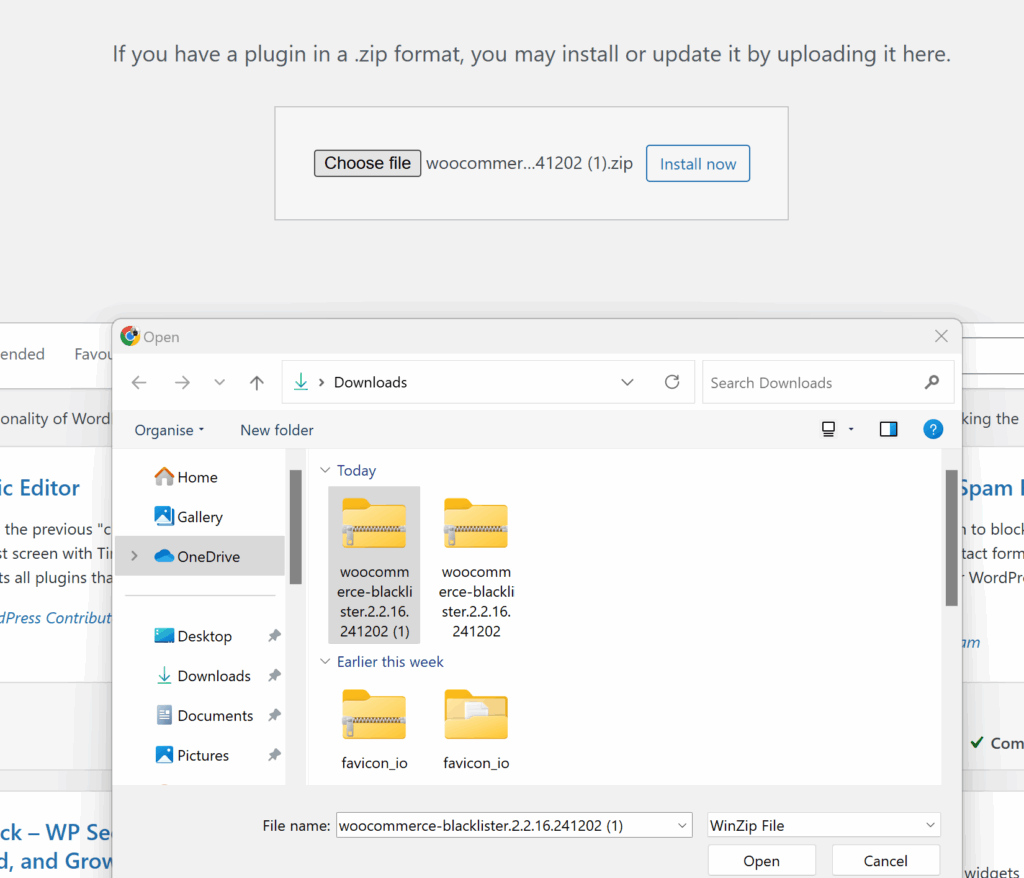
- Download the Aelia Blacklister plugin from the Aelia.
- Go to your WordPress admin dashboard, navigate to the “Plugins” section, and click “Add New.”
- Upload the plugin ZIP file and click “Install Now.”
- After installation, click “Activate.”
Step 2: Configure the Blocking Rules
Once you’ve located the Aelia Blacklister settings within WooCommerce, you’ll see an interface where you can set your blocking rules. The plugin gives you several options for blacklisting based on customer information, helping you target specific fraudsters. Here’s how to set each of them up:
Block by IP Address:
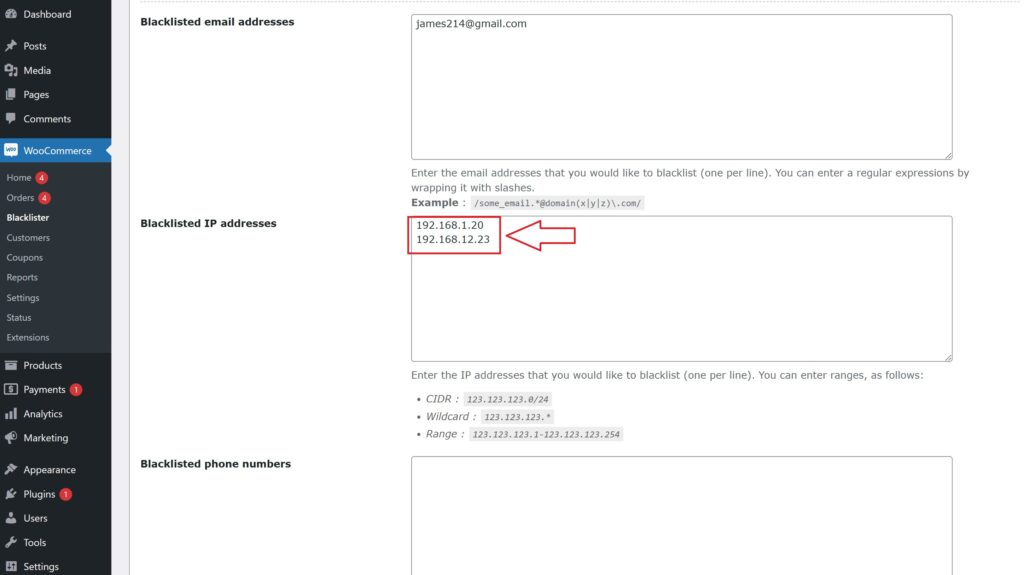
- Add Suspicious IPs: In the settings panel, you’ll find an option to add IP addresses to the blacklist. Simply input the IP addresses you want to block. These could be associated with known fraudsters or users who have been flagged for suspicious behavior.
- How to Block: Click on the option to add a new IP address. You can add multiple IPs if necessary. Once added, these users will not be able to complete the checkout process on your store.
- Why It’s Important: Fraudulent users often use specific IP addresses repeatedly to place fake orders. Blocking these IPs proactively reduces the risk of further fraudulent activity.
Block by Email Address:
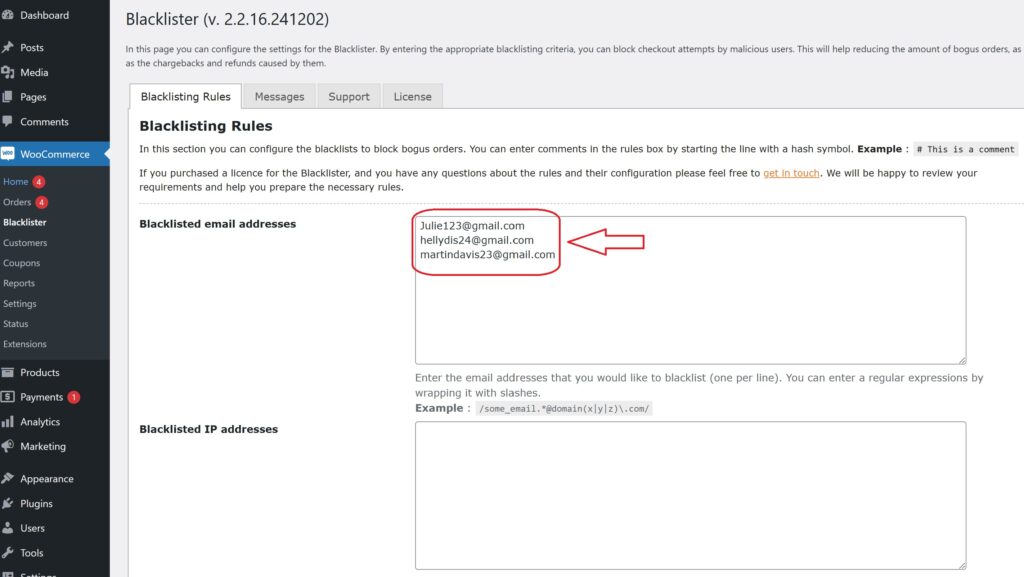
- Add Email Addresses to Block: You can add email addresses that are linked to fake accounts or suspicious activities. This can be especially useful for preventing scammers from creating multiple accounts to exploit your store’s promotions or loyalty programs.
- How to Block: Simply add the email addresses (or domains) in the designated field within the settings. You can block individual addresses or even an entire domain (e.g., block all @fakedomain.com addresses).
- Why It’s Important: Scammers often use disposable email services to create fake accounts. By blocking these addresses, you can stop them from using the same emails for repeated fraudulent purchases.
Step 3: Customize the Error Message
Under the plugin settings, you can customize the error messages that will be shown to blocked users. This ensures that customers understand why their order was rejected.
Step 4: Monitor and Update the Blacklist
After initial setup, you should regularly monitor blocked users and update your blacklist as necessary. Aelia Blacklister allows you to add new entries as fraudsters attempt to breach your store.
Aelia Blacklister for WooCommerce: More Than Just Blocking IPs and Emails
Blacklist Customer Details
With Aelia Blacklister, you can block customers based on their name, phone number, and location. Whether you want to block specific customers or limit access from certain areas, you have full control over your store’s security. You can set up both exact matches or partial matches (using regular expressions) for enhanced flexibility, ensuring only legitimate users can proceed with their orders.
Block Based on Location
Aelia Blacklister allows you to block customers from specific regions, cities, or even countries. If you notice certain areas prone to fraud or high-risk transactions, you can set up geographic-based blocking rules to protect your store.
Customizable Error Messages
For a better customer experience, you can provide custom error messages that explain why a customer was blocked from completing their purchase. This transparent communication ensures that your genuine customers understand why their order couldn’t be processed while keeping your store’s reputation intact.
Enhance Your WooCommerce Store with Aelia Plugins
Aelia offers several powerful plugins that can help enhance the functionality of your WooCommerce store. These plugins are designed to provide advanced features, streamline store management, and improve the overall user experience. Below are some notable Aelia plugins that could complement Aelia Blacklister and further boost your store’s security and performance:
1. Aelia WooCommerce Tax Display by Country
Aelia’s Tax Display by Country plugin ensures your WooCommerce store shows accurate tax information based on the customer’s location. It automatically adjusts tax rates, helping you comply with regional tax laws and offering transparency to your customers during checkout.
2. Aelia WooCommerce Product Prices by Country
Aelia Price By Country For WooCommerce plugin allows you to set different product prices for customers from various countries. It’s perfect for businesses that need to adjust pricing based on currency fluctuations or regional pricing strategies.
