
WooCommerce powers millions of online stores worldwide, making it one of the most trusted and widely adopted eCommerce platforms in today’s digital marketplace. Its open-source framework, exceptional flexibility, and seamless WordPress integration make it the preferred choice for businesses of all sizes, from solo entrepreneurs to global enterprises. However, the growing popularity of WooCommerce has also attracted increased phishing threats targeting store owners, making security awareness more important than ever.
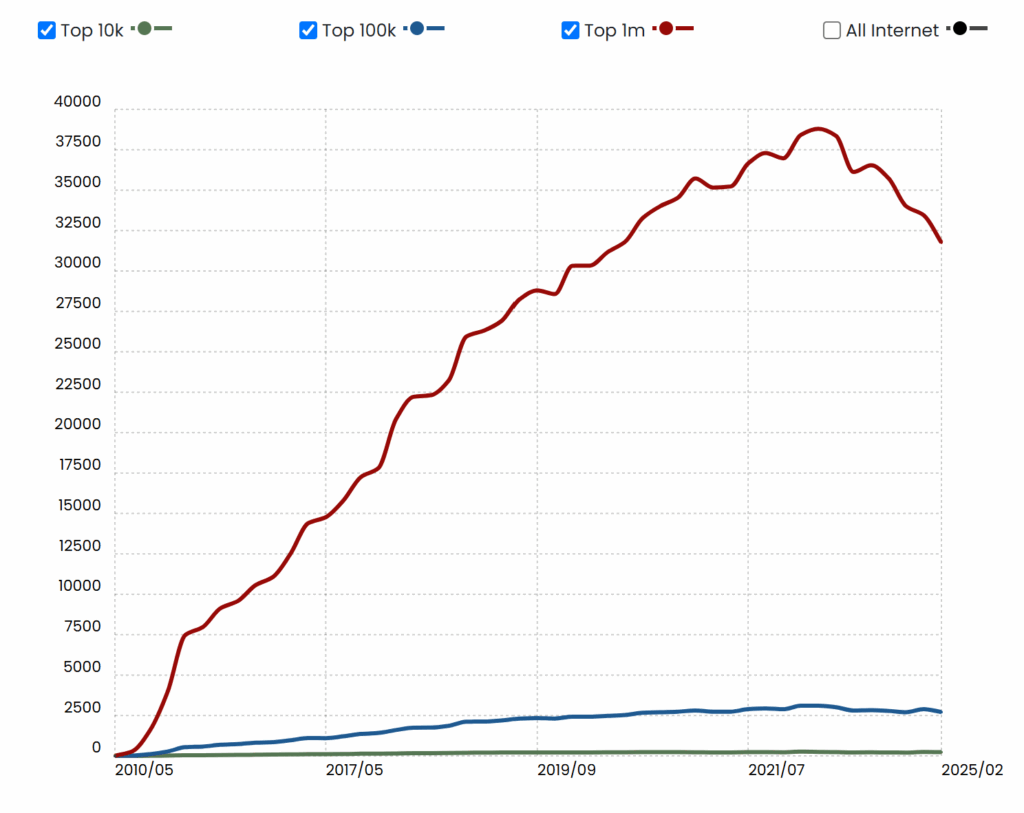
But with widespread adoption comes increased exposure to threats, especially from cybercriminals eager to exploit the platform’s popularity and users’ trust in urgent security notifications.
In April 2025, a particularly sophisticated phishing campaign began circulating, specifically targeting WooCommerce store owners. These emails, crafted to appear as official alerts, warned recipients about a so-called “critical vulnerability” on their site and instructed them to install an emergency patch. Instead of safeguarding their stores, however, these patches delivered malware, created hidden backdoors, and opened the door to complete site takeovers.
The alarming level of detail and deception in these scams has drawn attention from both WooCommerce users and cybersecurity professionals alike. In one reported case, a store owner recounted their experience with a nearly convincing phishing message that could have compromised their entire business.
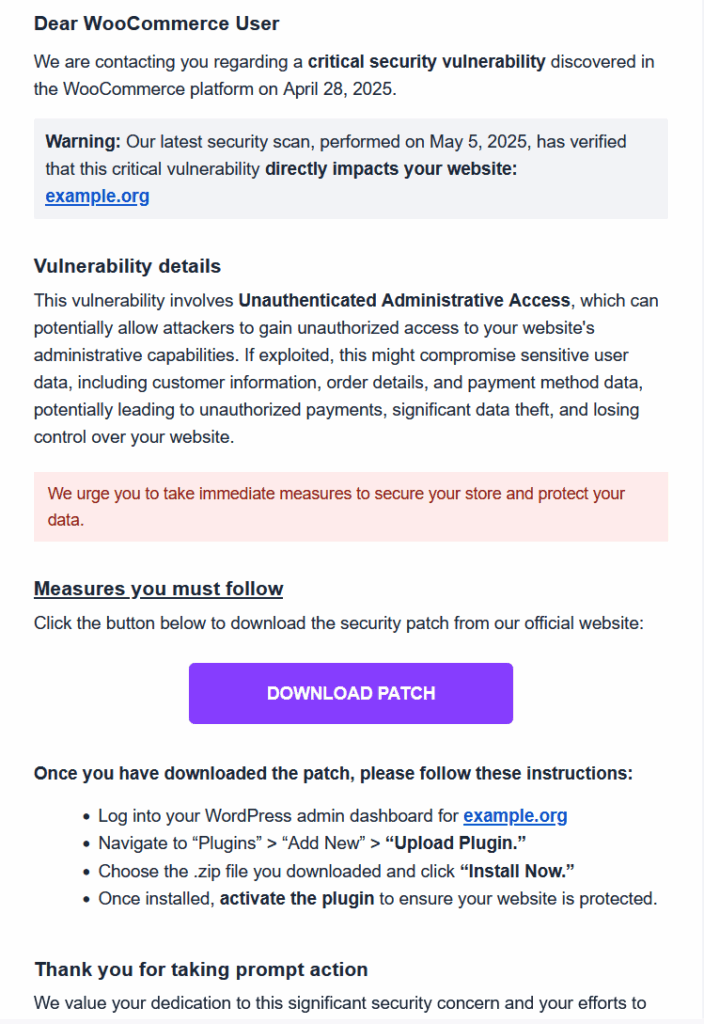
“I just received a phishing email (see image). It looked suspicious, coming from mail-woocommerce.com. I followed the link on a virtual machine, and the page looks almost authentic. They even have fake reviews. I downloaded the proposed ‘patch’, and it’s clearly malicious, with cryptic code. It creates one or more admin users, fetching data from somewhere. The funny thing is that the domain from which they serve the patch is almost identical to woocommerce.com, it’s ‘woocommerċe.com’ with the tiny diacritic on the last ‘c’. On a black on white screen, it could be overlooked as a speck of dust. That is clever, in twisted, wicked way.”
How the Scam Works
1. Deceptive Email Communication
Store owners receive urgent emails from addresses resembling official support contacts, such as [email protected], [email protected], or [email protected]. These emails often include your actual store URL to build trust and legitimacy, warning of a critical vulnerability that needs immediate fixing.
2. Homograph (IDN) Domain Spoofing
One of the most sophisticated techniques in this campaign is the use of homograph attacks, also known as IDN spoofing. For instance, attackers might use a domain like https://xn--woocommere-7ib.com, which appears as woocommerċe.com In some browsers. The subtle dot under the “ċ” can easily go unnoticed, tricking users into believing they’re visiting the real WooCommerce website.
3. Malicious Patch Download
The email typically urges users to install a “critical WooCommerce update” via a download link. The file mimics a plugin but contains malicious code designed to:
- Create unauthorized admin accounts
- Install persistent backdoors
- Exfiltrate data to a remote command-and-control server
4. Convincing Design and Branding
To further deceive users, the phishing websites are crafted to look exactly like WooCommerce’s official site. They feature realistic branding, fake reviews, and functional buttons, all designed to lull users into a false sense of security.
What You Can Do to Stay Safe
To avoid falling victim to these scams, only install plugins and updates directly from WooCommerce.com or your WordPress dashboard. Be cautious of urgent email prompts, especially those asking you to download patches or log in via unfamiliar links.
For a more in-depth guide on safeguarding your store, check out this helpful article on how to block fraudsters from your WooCommerce store.
How to Spot a WooCommerce Phishing Email
Phishing emails are crafted to resemble legitimate security alerts from WooCommerce, but if you know what to look for, you can catch the red flags before falling victim. Here are the key warning signs to help you identify a scam:
1. Suspicious Email Addresses
These emails do not come from official WooCommerce or Automattic domains. Instead, they use misleading addresses that appear convincing at a glance. Examples include:
Even though they contain the word “WooCommerce,” these domains are fake and not affiliated with the platform. Always inspect the full email domain carefully before taking action.
2. Lookalike URLs Using Punycode
One of the more advanced tricks used in phishing campaigns involves Punycode,a method that disguises URLs using special characters. For instance, a malicious link like https://xn--woocommere-7ib.com might render in browsers as woocommerċe.com.
At a quick glance, it looks identical to the real site, but the character “ċ” includes a tiny dot, which is easy to overlook,especially on mobile devices or small screens. Clicking these links can take you to a fake WooCommerce page designed to harvest credentials or push malware.
3. Fake Alerts About Critical Vulnerabilities
Phishing messages often claim that your store has been hit with a “critical vulnerability,” citing a specific date (e.g., April 14, 2025) to sound more urgent and believable. These emails may even reference your actual website URL to appear more personalized.
The goal? To pressure you into acting fast, without stopping to verify if the alert is real.
4. Malicious ‘Security Patch’ Downloads
The most dangerous part of these emails is the call to download a supposed “security patch.” These attachments or links are usually disguised as plugins or updates but are malware.
Installing them can:
- Give hackers access to your WordPress admin
- Inject backdoors or create hidden admin accounts
- Compromise customer data and site functionality
The Hidden Dangers Lurking Behind the “Download Patch” Button
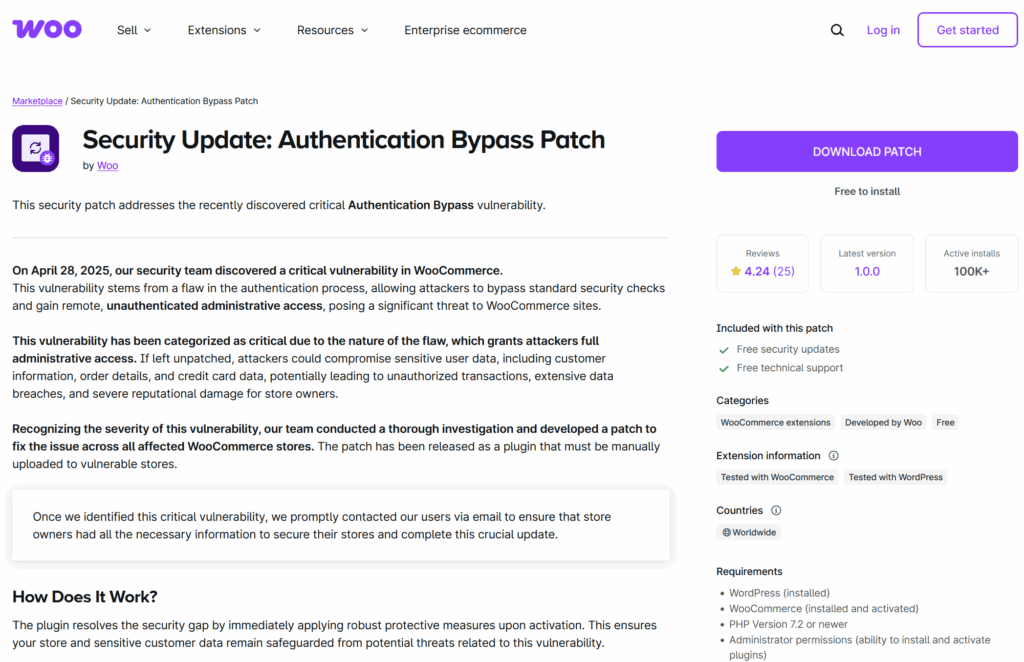
The real trouble begins the moment a store owner clicks the fraudulent “Download Patch” link in a phishing email. Disguised as a critical WooCommerce update, the attached file,often named something like woocommerce-security-patch.zip,appears safe and official. But beneath the surface, it’s a carefully crafted piece of malware designed to silently hijack your site.
Step 1: Silent Malware Installation
Once uploaded and activated in your WordPress dashboard, the plugin executes encrypted or heavily obfuscated code. This allows it to bypass standard security tools while embedding itself into your site’s core files or database. The malicious code runs in the background, undetected, laying the groundwork for further compromise.
Step 2: Creation of Hidden Admin Accounts
One of the malware’s first tasks is to create unauthorized admin users. These accounts are cleverly named to avoid raising suspicion,think wp-support, admin-helper, or even usernames with subtle typos mimicking legitimate accounts.
These hidden accounts act as backdoors, ensuring attackers retain full access even if you remove the original malware.
Step 3: Backdoor Deployment
Next, the malware installs persistent backdoors,custom scripts embedded in plugin files, theme templates, or cron jobs (automated tasks). These entry points are difficult to detect without a thorough security audit and allow the hacker to regain control of your site at any time, even if you believe the threat has been removed.
Step 4: Data Theft and Exfiltration
With full access, the malware begins siphoning off valuable site data. This may include:
- Customer profiles and login details
- Order history and payment data
- Admin credentials and configuration files
This stolen information is quietly transmitted to an external command-and-control server, putting your business,and your customers,at serious risk of identity theft, fraud, and regulatory violations such as GDPR non-compliance.
Step 5: Exploiting Your Store for Malicious Activity
Once compromised, your WooCommerce store can be weaponized in multiple ways, including:
- Sending spam or phishing emails using your server
- Redirecting customers to fraudulent or malicious websites
- Injecting malware into your frontend to target site visitors
- Locking you out of the admin dashboard via ransomware
The longer the malware remains active, the more extensive the damage, jeopardizing your store’s reputation, customer trust, and bottom line.
How to Spot Fake WooCommerce Emails
It’s essential to remember: WooCommerce will never send updates, plugins, or patch files via email attachments or links to unknown third-party domains.
Legitimate WooCommerce Communications Will Always:
- Come from an official email address like
@woocommerce.comor@automattic.com - Direct you to trusted domains, such as woocommerce.com or wordpress.org
- Include complete, transparent documentation with clear instructions and verification steps
If an email doesn’t follow this pattern, treat it as suspicious and avoid taking any action.
What to Do If You Receive a Suspicious Email
If you think you’ve received a phishing attempt, do not interact with the message. Follow these steps instead:
1. Avoid Clicking on Any Links
Phishing emails often use masked URLs that look legitimate but lead to dangerous sites or trigger automatic malware downloads. Even if the link appears trustworthy, don’t click it.
2. Never Download or Install Attachments
Malicious “patches” or plugins sent via email are designed to:
- Install malware or spyware
- Create hidden admin accounts
- Alter core site files to open backdoors
If you’ve already downloaded a file, do not open or run it.
3. Report the Email Immediately
Use the “Report phishing” feature in your email client (such as Gmail or Outlook) to alert your provider. Additionally, report the domain to your web host or WooCommerce support so they can investigate and help prevent others from being targeted.
Secure Your WooCommerce Store Against Phishing and Fraud
Protecting your store from phishing attempts is crucial. Here are some proactive measures to strengthen your site’s security:
1. Only Install Updates from Official Sources
Always apply WooCommerce core, plugin, and theme updates through the WordPress dashboard or from verified platforms like woocommerce.com. Never trust files sent via email, even if they appear urgent or professional.
2. Enable Auto-Updates for Security Fixes
WooCommerce and trusted plugin authors frequently release critical security patches. Enabling auto-updates ensures your site stays current and protected without needing manual checks.
3. Use Strong Passwords and Two-Factor Authentication (2FA)
Secure your admin accounts with:
- Unique, strong passwords
- Two-factor authentication (2FA)
This significantly reduces the risk of unauthorized access,even if your credentials are compromised.
4. Install Plugins Only from Trusted Repositories
Stick to WooCommerce.com or WordPress.org when downloading plugins. Avoid third-party sites, especially if linked through email,many contain hidden malware or backdoors.
5. Block Suspicious Users with Aelia Blacklister for WooCommerce
Add an extra layer of fraud prevention with the Aelia Blacklister for WooCommerce. This plugin allows you to automatically block suspicious orders based on:
- Name or billing/shipping address
- Email address or phone number
- IP address or defined ranges
When a match is found, the checkout process is stopped and a custom message is shown to the user. This is especially effective for preventing recurring fraud attempts or traffic from known malicious sources.
